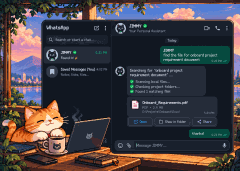
JIMMY is an AI agent that lives on your Windows PC. Text your own WhatsApp, “send my resume from Downloads to Rahul”, and it finds the file, checks with you, and sends it.
Stop opening your laptop for small stuff. Text JIMMY instead.
1.0 / Ask
Ask in plain English
Type what you need the way you would say it to a friend. JIMMY works out the steps and tells you when it is done.
01
Find and send files
"Send my resume from Downloads to Rahul." JIMMY finds the file in the folders you allowed, shows you exactly what goes to whom, and sends it after your YES.
02
Browse GitHub and share links
"Find the Jimmy report on my GitHub and send me the link." It searches your repositories and replies with the link.
03
Take screenshots
Ask for a screenshot and see what is on your screen without walking back to your desk.
04
Open apps and run commands
Open the apps you approved, or run a quick check like free disk space. Anything that changes things asks you first.
Chats
JIMMY 5:21 PM
Found it! 🎉
Saved Messages4:02 PM
Notes, links, files…
JIMMY Your Personal Assistant
Today
JIMMYfind the file for onboard project requirement document5:20 PM
Searching for “onboard project requirement document”…
One message can hold several steps. Tasks that worked are saved as skills you can review or delete.
01
Draft emails in your Gmail
JIMMY reads your inbox and writes drafts. You send them yourself, or approve with your PIN.
02
Run scheduled tasks
Set something to run every morning or every hour, and JIMMY handles it on time. If a scheduled task would message someone else, it still asks you when it runs.
03
Do several steps from one message
"Find my resume and send it to me, then open Chrome." JIMMY runs the steps in order and stops if one fails.
04
Skills you can review or delete
Tasks that worked are saved as skills, so next time JIMMY reuses them instead of starting over. Read or delete any skill from WhatsApp or the dashboard. A skill that changes things still asks before it runs.
9:00 AM
Send me my morning summary
Every day at 9:00 AM, to your own chat
Sent at 9:00 AMNext: tomorrow
3.0 / Control
You stay in control
JIMMY runs on your own PC, and your files and memory stay on your machine. It only listens to you, and it asks before it does anything you would want to check.
I’m Vedansh, an independent developer in India, and I build every part of JIMMY myself: the Windows app, the WhatsApp agent and this website. JIMMY asks before it sends, deletes or changes anything, and your files stay on your PC. If something doesn’t work the way this page says, email me and I’ll answer personally, or take the 7-day money-back guarantee.
JIMMY is an AI agent that runs on your Windows PC and takes instructions from your own WhatsApp chat. You text it like a person ("send my resume from Downloads to Rahul") and it finds files, opens apps, runs tasks and replies when it’s done.
Who can control JIMMY?
Only you. JIMMY answers messages from your own WhatsApp number and ignores everyone else, so other people can’t give it instructions even if they message you.
Will JIMMY message people without asking me?
No. Before JIMMY sends a message or email to anyone, it shows you exactly what it will send and waits for your YES (and, during bigger tasks, your PIN). Scheduled tasks that would message someone ask you at the moment they run.
Can WhatsApp ban my number?
It’s possible, and you should know before you start. JIMMY links to WhatsApp the same way WhatsApp Web does, but it isn’t an official WhatsApp client, and WhatsApp’s terms don’t allow unofficial clients, so your account could be restricted or banned. JIMMY never sends bulk messages and only messages other people when you ask and approve, but nobody can promise WhatsApp won’t act. If losing your number would be a serious problem, link a second number instead.
What if JIMMY misunderstands me?
Nothing that matters happens without you. Before JIMMY sends, deletes or changes anything, it shows you the exact action and waits for your YES, so you can reply NO and say it again. If a file change went wrong anyway, send "undo".
Does JIMMY work when my PC is off?
No. JIMMY runs on your PC, so it only works while the PC is on and connected to the internet. It starts with Windows and waits quietly in the tray.
Do I need to pay for an AI model?
No. Simple commands are understood without any AI, and the Antigravity CLI from Google is free. If you prefer, use your own API key for OpenAI, Anthropic (Claude), Google Gemini, Groq or OpenRouter (that provider bills you for usage), or a model on your own PC through Ollama or LM Studio, so nothing leaves your machine.
What does JIMMY cost?
Monthly is $9.99 a month and starts with a 3-day free trial. Lifetime is $29 once, a founder deal for the first 100 buyers only. Both plans include every feature and all updates, with a 7-day money-back guarantee.
Can I cancel anytime?
Yes. Cancel the monthly plan from your dashboard (Manage billing). That stops the next charge, and JIMMY keeps working until the end of the period you’ve paid for. Cancel during the 3-day trial and you aren’t charged.
Does JIMMY work on Mac or Linux?
Not yet. JIMMY is a Windows app for Windows 10 and 11 (64-bit). You control it from WhatsApp on any phone, iPhone or Android.
What does the Windows SmartScreen warning mean?
The installer isn’t code-signed yet, so Windows doesn’t recognise it and SmartScreen may say “Windows protected your PC”. Choose More info, then Run anyway. Once JIMMY is installed, every update is checked against JIMMY’s own signature before it’s applied.
What happens to my files and messages?
They stay on your PC. JIMMY keeps its memory, settings and activity log in a folder on your computer, and I never receive your files, chats or activity. Only the text of a request goes to the AI service you picked, after JIMMY removes passwords, keys and card numbers.
Can I undo something JIMMY did?
Yes. Send "undo" on WhatsApp to reverse the last file change. Deleted or overwritten files are kept in an undo folder for 30 days, and you can restore any of them from the dashboard.